Before you install
- Use a legally owned local game. Record its exact edition, build and mod loader; check the loader’s own documentation before changing anything.
- Upstream lists Python 3.10+ and ffmpeg as prerequisites, with uv recommended for Python tooling.
- Blender is only needed for the 3D-to-sprite workflow. You can start a small text or behavior change without that asset pipeline.
- The guide and preparation tool are free to use. AI agent access and optional asset services may cost money under their providers’ plans. Check those plans before proceeding.
Install in the right place
1. Set up Claude Code
Follow Anthropic’s current instructions for your operating system, sign in through the official flow, and confirm Claude Code opens. Keep account credentials and API keys out of this website.
Open official Claude Code setup
2. Add the upstream plugin
Paste these two lines, one at a time, into an interactive Claude Code session. They are plugin slash commands, not PowerShell, Command Prompt or shell commands.
/plugin marketplace add rehan-remade/universal-modder
/plugin install universal-modder@universal-modder3. Confirm the plugin is available
Check Claude Code’s installed plugin list, then ask the agent to list the available Universal Modder skills before doing any game work. The upstream plugin bundles the um CLI. A successful plugin installation still does not prove your game, loader or proposed change will work.
Choose assets later
fal is an optional paid asset route. Upstream also describes a local ComfyUI image route. Start with existing assets or a simple change when possible; no API key is required by this website.
An optional asset-making workflow
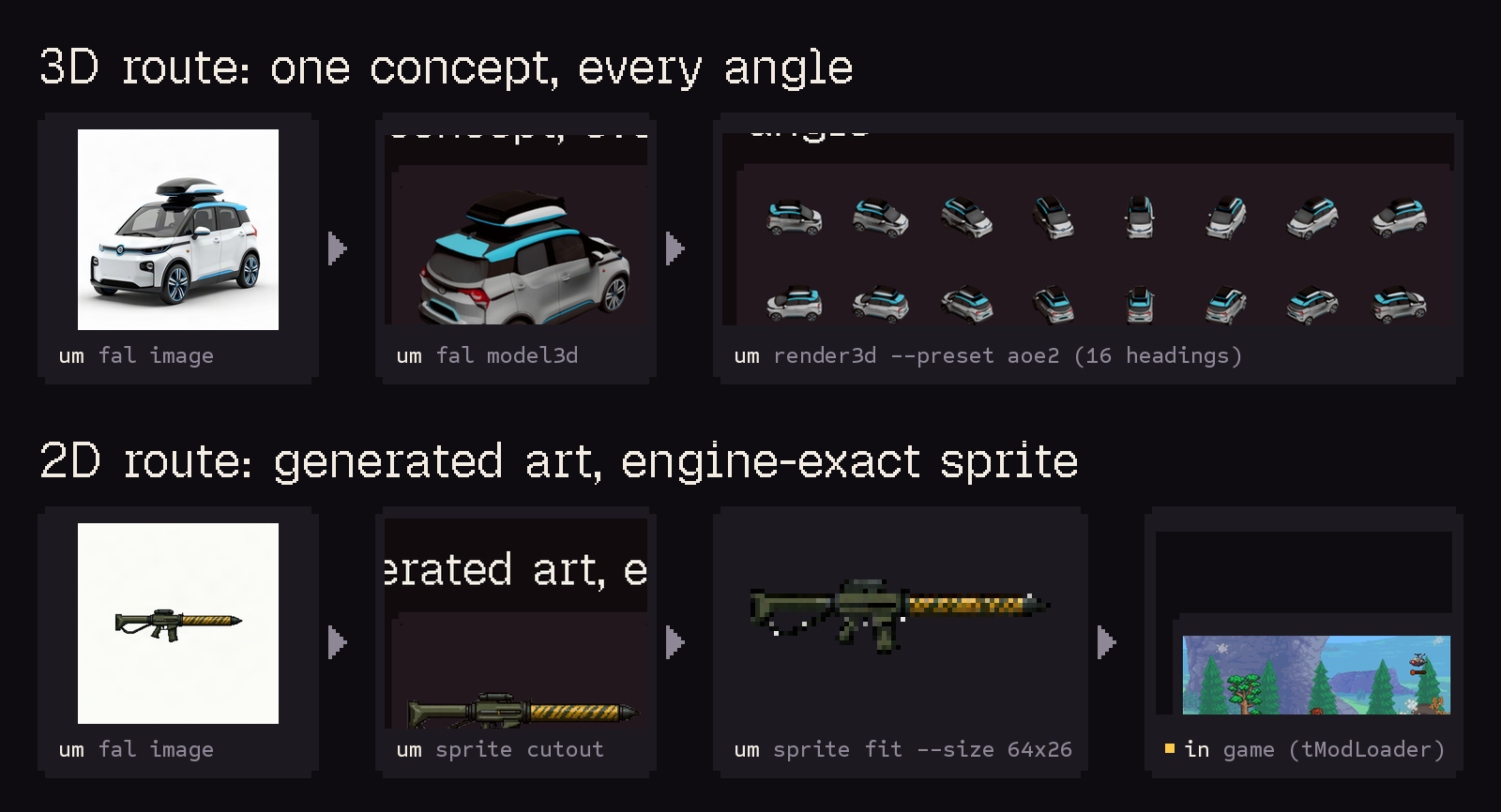
The original Universal Modder project illustrates two asset routes below: generating and rendering a 3D model, or preparing a 2D sprite for tModLoader. This is an upstream illustration, not a mod generated or tested by this website. The fal steps require a key and may incur service charges; local ComfyUI is an alternative image route.

If setup gets stuck
Plugin command not found
First check where you pasted it: plugin slash commands belong inside Claude Code. If the session does not recognize plugins, review the official setup and plugin documentation for your installed release.
Python, ffmpeg or um is not found
Ask the agent to report which executable and version it can see. A tool installed in Windows may not be visible inside WSL, and a changed PATH may need a new session. Match the environment before attempting a game change.
The mod does not load
Record the exact game edition, game build, loader version and error log. Compare them with the case’s stated versions. A newer build or different edition remains unverified until you test it.
Read the original sources
Universal Modder is maintained by rehan-remade. universalmodder.net is an independent guide and preparation tool, with no claim of official affiliation. The source project’s license does not grant rights to game files or third-party assets.
Source review: 2026-10-05. We have not installed this plugin or run these games locally. These instructions describe upstream documentation, not a compatibility certification.